
CSA TUTORIAL
Steps to Start the CSA Questionnaire
To be able to enter information into your CSA questionnaire the following needs to be in place:
- A selected and saved participation window.
- A selected and saved datapoint confidentiality designation.
- An open participation window (i.e. start date or later).
This tutorial explains how to select and save your 2026 CSA participation window, the two participation types, and the data level confidentiality designation.
While S&P Global offers different participation windows, each window has a limited quota, and booking is subject to availability. Book early to ensure your company gets the most convenient window to complete the CSA, meeting your public reporting cycle and team availability.
The 2026 CSA questionnaire is available for all companies to view as of 1 April 2026, independent of any chosen participation window start date.
Companies will be able to view the questionnaire after 1 April.
Select and save the participation window
To select a participation window, a user registered as an Administrator for your company must log into the Sustainability Reporting Portal and navigate to the CSA. There are two ways to access the CSA:
- Select 'Frameworks' from navigation menu at the top of the screen. From there, under CSA, select Response and ensure you are on the ‘Confirmation’ tab.
- Click on the ‘2026 Corporate Sustainability Assessment’ link on the Sustainability Portal Dashboard page.
In the Confirmation tab, below ‘Plan your company's participation’ you will find all available participation windows.
Select your participation window
There are two participation window types:
1. Self-Paced:
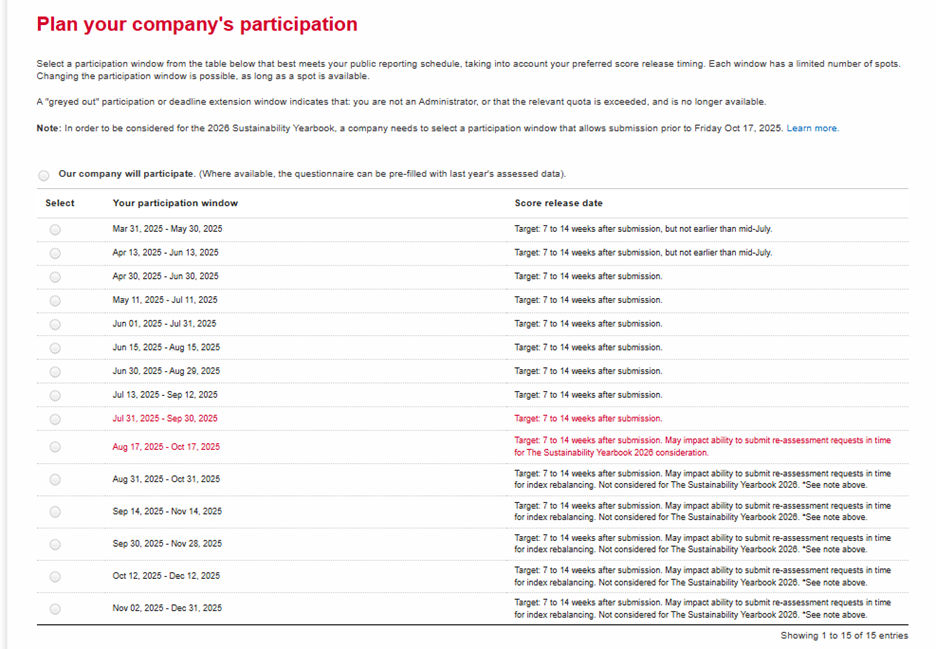
The company responds to the questionnaire after the start of the selected window.
If the company has previously participated or was assessed on public information in the previous CSA cycle, it may opt to use a pre-fill from the prior years assessed data. Once finished with data entry, the company submits the questionnaire to S&P Global for analyst review and scoring.
If you want to choose this option, you need to:
- Select the option “Our company will participate. (Where available, the questionnaire can be pre-filled with last year's assessed data).”
- Select the window that meets your schedule and is available
2. Review & Add:
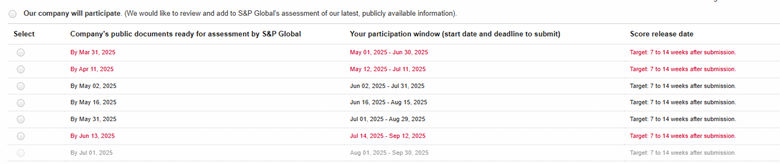
The company responds to the questionnaire after first pre-filling with information from their most recent disclosures.
To understand which window to select and how that impacts your participation please read on:
The first column of the table indicates the date by which the company's most recent reporting should be publicly available (website). The ~30 days following this date is the period when S&P Global analysts will review the company's publicly available data and enter information that meets the CSA methodology requirements in the company’s CSA questionnaire.
The dates in the second column show the date when the company's participation window will start, allowing registered users to add to the pre-filled questionnaire. Once the company completes their review and if applicable provides additional or updated disclosure, it will submit the questionnaire back to S&P Global for final review and scoring.
If you want to choose this option, you need to:
- Select the option “Our company will participate. (We would like to review and add to S&P Global’s assessment of our latest, publicly available information):
- Select the window that meets your schedule and is available
Save your participation window

Once you have selected a window, be sure to save your selection by clicking the save button. You will receive an automated notification including details of your selected window, and this will be saved in the Portal Inbox with the email subject: “2026 CSA Participation Window Selection for COMPANY NAME”.
Select and Save the Datapoint Confidentiality Designation
After you have selected your participation window, your next step is to save your confidentiality designation option for datapoints.
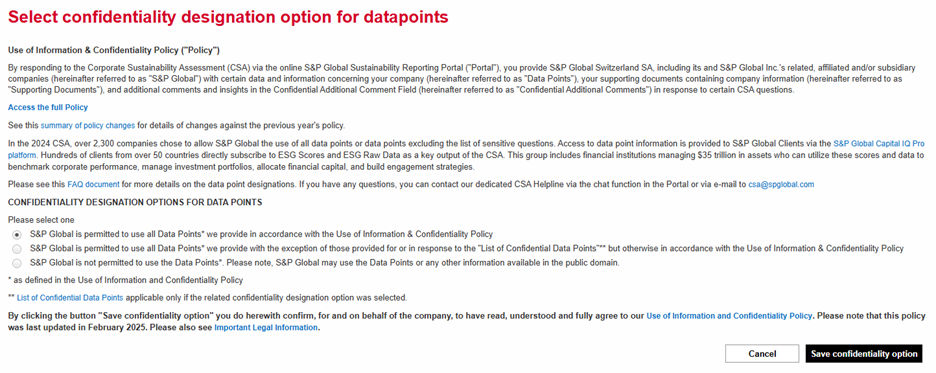
Each of the three options are outlined below, highlighting what information is shared and what is not shared:
| Option | What is shared | What is not shared |
|---|---|---|
| S&P Global is permitted to use all Data Points* we provide in accordance with the Use of Information & Confidentiality Policy. | Datapoint level information for all question types. | Supporting documents and comments made in the “additional confidential comments” field. |
| S&P Global is permitted to use all Data Points* we provide with the exception of those provided for or in response to the "List of Confidential Data Points"** but otherwise in accordance with the Use of Information & Confidentiality Policy. | Datapoint level information for all question types. | Supporting documents and comments made in the “additional confidential comments” field. Datapoints included within the List of Confidential Data Points. |
| S&P Global is not permitted to use the Data Points*. Please note, S&P Global may use the Data Points or any other information available in the public domain. | Datapoint level information for questions indicated in the Portal by the following banner: This question requires publicly available information. Additional data points identified within the Use of Information Policy. |
Supporting documents and comments made in the “additional confidential comments” field. Datapoint level information for questions where you see the designation: Full credit is only possible with relevant publicly available information. Datapoint level information for questions where there is no designation in the Portal, indicating that we allow for fully private disclosures. |
There are no scoring implications. You may select whichever option is most appropriate for your company. If you have participated in previous years, you may view the previous selected designation by looking in your Portal Inbox, searching for the email subject: “Data point confidentiality designation option for COMPANY NAME”.
You may change your confidentiality designation up to the point of submission. No changes can be made after the questionnaire has been submitted.